- Published on
- 2 min read
> Aligning Text in SwiftUI
Understanding Text Alignment in SwiftUI
SwiftUI offers three distinct ways to control alignment of Text views, each serving a different purpose. There are ways of aligning Text views relative to each other, relative to their parent, and ways of aligning the lines of text within a Text view.
VStack Alignment
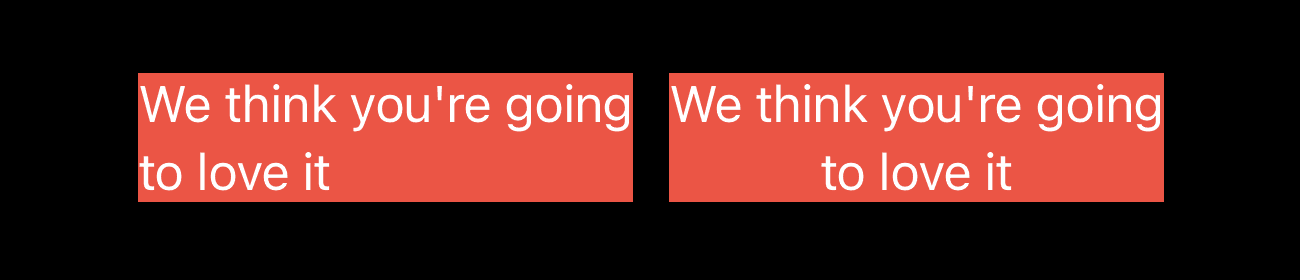
The VStack's alignment parameter controls how child views align relative to each other. This means that you can place multiple Text views in a VStack and control the alignment of the entire VStack as a unit. For example, here's the same two Text elements with leading vs. center alignment. The both VStacks are centered within their parent, but their children align relative to each other.
VStack(alignment: .leading) {
    Text("We think you're going")
    Text("to love it")
}
.background(.red)

VStack(alignment: .center) {
    Text("We think you're going")
    Text("to love it")
}
.background(.red)
Frame Alignment
The frame modifier controls how the children of a view are aligned relative to the parent, rather than to each other. So, for example, this VStack is aligning its children along their leading edge, but is positioning the two Text views together along the trailing edge of the VStack.
VStack(alignment: .leading) {
    Text("We think you're going")
    Text("to love it")
}
.frame(width: 300, alignment: .trailing)
.background(.red)

Multiline Text Alignment
multilineTextAlignment specifically handles how lines of text align within a text view when its contents require more space than the text view has available. The Text view is still aligned relative to the parent view, as defined by the frame modifier, but the wrapping lines of text are aligned by the multilineTextAlignment modifier.
VStack {
    Text("We think you're going to love it")
        .multilineTextAlignment(.center)
}
.frame(width: 200, alignment: .trailing)
.background(.red)

When building your apps, you'll often find that it is necessary to use a combination of these alignment types to achieve the desired effect. For example, you might use a VStack alignment to control the overall alignment of a Text view, and then use a frame alignment to control the alignment of the text within the text view.
// Continue_Learning
How to scale text to fit its parent view with SwiftUI
Learn the ways to scale a text view's font size to fit its parent view in SwiftUI.
How to Change the Background Color of a View in SwiftUI
Learn different ways to set background colors on SwiftUI views, from simple color fills to gradients and materials.
Rounding Corners in SwiftUI: From cornerRadius to clipShape
The cornerRadius modifier is deprecated in iOS 17. Here's how to use clipShape, RoundedRectangle, and the new ConcentricRectangle to round corners the modern way.
// Stay Updated
Get notified when I publish new tutorials on Swift, SwiftUI, and iOS development. No spam, unsubscribe anytime.